
Sales engineering template
Discovery call template with a process map
This discovery call template gives a sales engineer the call stages, the questions to ask, and a process map that builds while the prospect talks. Open it in Wavelength before the call. Map the prospect's current process live, confirm it on screen, and send the map with the recap the same day.
Free plan, no card. Opens in the Wavelength editor.
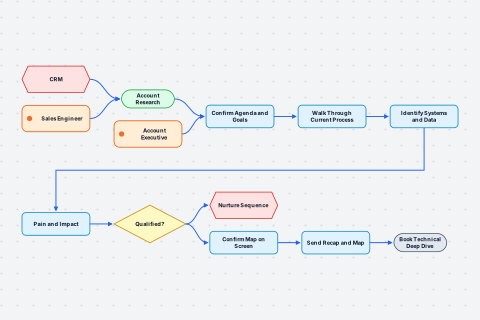
- Sales Engineer Person or team
- CRM System
- Account Executive Person or team
- Account Research Start
- Confirm Agenda and Goals Step
- Walk Through Current Process Step
- Identify Systems and Data Step
- Pain and Impact Step
- Qualified? Decision
Yes: Confirm Map on Screen. No: Nurture Sequence - Confirm Map on Screen Step
- Nurture Sequence System
- Send Recap and Map Step
- Book Technical Deep Dive End
Before the call, the sales engineer researches the account in the CRM. On the call, the account executive confirms the agenda and the goals. The sales engineer asks the prospect to walk through the current process step by step and maps it live. Then the sales engineer asks which systems hold the data at each step. The account executive asks where the process breaks and what that costs. The account executive checks if the deal is qualified. If it is not qualified, the contact goes to a nurture sequence. If it is qualified, the sales engineer confirms the map with the prospect on screen. After the call, the sales engineer sends the recap with the map, and the account executive books the technical deep dive.
Wavelength drew this flow from the conversation above. Say your own version and it draws yours.
The template structure
The call has six stages. Each stage has one owner and one output. The times are a starting point for a 50 minute call. Change them to fit your team.
| Stage | Owner | Time | Output |
|---|---|---|---|
| Account research | Sales engineer | 20 min before the call | Known systems and open questions |
| Agenda and goals | Account executive | 5 min | An agreed goal for the call |
| Current process walkthrough | Sales engineer | 20 min | The process map, built live |
| Systems and data | Sales engineer | 10 min | A system or data store on each step |
| Pain and impact | Account executive | 10 min | The steps that break, and the cost |
| Confirm and next step | Sales engineer and account executive | 5 min | A confirmed map and a booked deep dive |
Questions a sales engineer asks
Current process. Each answer adds steps to the map.
- What starts this process? An email, a form, a file, or a schedule?
- Who does the first step, and in which tool?
- What happens next, and who does it?
- Where does someone make a decision? What is the rule?
- How do you know the process is finished?
Systems and data. Each answer adds a system or a data store.
- Where does the data live between these two steps?
- Which system is the source of truth for this record?
- How does the data move: an API, a file export, or a person who copies it?
- How often does it move: in real time, each hour, or each night?
Pain and impact. Each answer marks a step on the map.
- Which step breaks most often?
- What does a failure at that step cost you in time or money?
- Who finds out first when it breaks?
How it works
- Open the template before the call. Rename the flow for the account.
- Open the side panel. Use Wavelength for Chrome beside Teams, Meet, or Zoom on the web, or keep the app open in another tab.
- Hold the mic while the prospect talks. The prospect's process builds on the canvas. If the prospect is far from your microphone, repeat each step in your own words.
- Share your screen for the last five minutes. Ask the prospect to confirm each dashed amber line. Those are links the AI inferred.
- Send the map. Attach the flow to the HubSpot deal or the Salesforce opportunity from Export, and send the recap the same day.
A worked example: one discovery call
The prospect is an operations lead at a distributor. This is part of the walkthrough stage:
The map from this part of the call:
- Steps: Email PO to shared inbox, Enter PO in NetSuite, Credit approval, Nightly CSV export, Pick and ship.
- Actors: Customer, Order Clerk, Credit Team, Warehouse.
- Systems and data stores: Shared Inbox, NetSuite, Warehouse System.
- Decision: New customer?
- Pain: Manual entry in NetSuite, marked on the map as the step that breaks.
The prospect did not say what credit does with a rejected customer. The "No" branch has no next step. That is the first question for the technical deep dive.
By hand or with Wavelength
| Task | By hand | With Wavelength |
|---|---|---|
| Capture the process | You type notes and listen at the same time. | The map builds while you hold the mic. |
| Confirm it | You send a drawing days later. | The prospect confirms the map on screen before the call ends. |
| Find the gaps | You find them while you write the recap. | Dead ends and dashed amber lines show them in the call. |
| Update the CRM | You paste notes into the deal. | Attach the diagram, a summary, and a live link to the deal. |
| Brief the team | You redraw the process for the deck. | Export PowerPoint or PDF, or share a read-only link. |
Every new account starts with 7 days of Pro. No card needed.
Who uses this template
Sales engineers and account executives run it as a pair. The account executive owns the agenda and the qualification. The sales engineer owns the map. See how sales engineers use Wavelength and the discovery calls use case.
Start from it
Open the template and the flow is on the canvas, laid out and ready to edit.
Change it by talking
Say what is different in your team. Wavelength adds, removes, and renames the shapes for you.
Send it
Share a link, or export to PNG, PDF, PowerPoint, draw.io, BPMN, or an SOP document.
Related templates
View all templates →
Questions
Is the discovery call template free?
Yes. Every Wavelength plan can open it, the Free plan included. The Free plan saves up to 5 flows and needs no card.
Can I map the call while it runs?
Yes. Open the Wavelength side panel in Chrome beside Teams, Meet, or Zoom on the web and hold the mic while the prospect talks. You can also upload the recording or the transcript after the call.
Does the prospect need an account?
No. The prospect watches your shared screen, or opens a read-only link that you share. Only you need an account.
Where does the map go after the call?
Attach it to a HubSpot deal or a Salesforce opportunity from Export, or export PowerPoint, PDF, or draw.io. On Pro you can also email the flow with an AI recap.
Can I change the stages and the questions?
Yes. The questions on this page are a guide. The template is a normal flow: rename, add, or delete steps by voice, with a prompt, or by hand.
Run your next discovery call with a live map
Open the template, hold the mic, and send the confirmed map the same day.