
Process documentation
Document a process in the time it takes to explain it
Talk through how the work runs. Wavelength draws the process map while you talk, then gives you the map and a written SOP from the same source.
Free plan, no card. Pro is $7 per month.
Capture the process once
The person who does the work explains it one time. You do not schedule three follow-up meetings to fill gaps.
Keep the exceptions
Decisions and handoffs appear as you mention them. The edge cases stay in the map, not in someone's memory.
One source for map and SOP
The diagram and the SOP come from the same flow. Fix a step on the canvas and the next export shows the fix.
How teams use Wavelength for process documentation
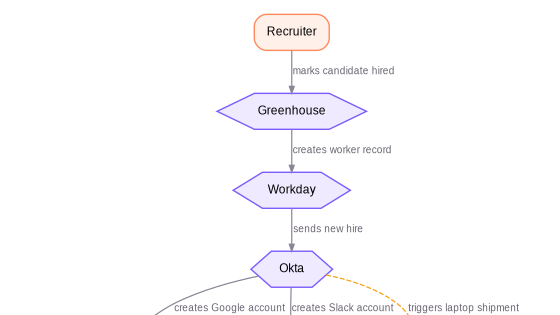
Onboarding processes
Map the first 30 days for a new hire, with owners for each step.
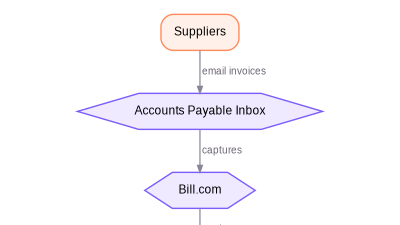
Approval workflows
Show who approves what, and what happens when a request is rejected.
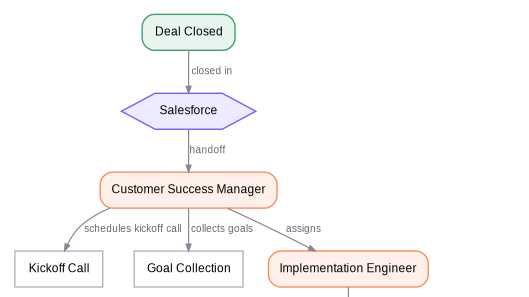
Customer onboarding
Document the steps from signed contract to first value.
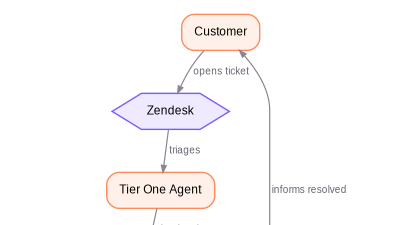
Escalation paths
Make the support escalation rules clear for every tier.
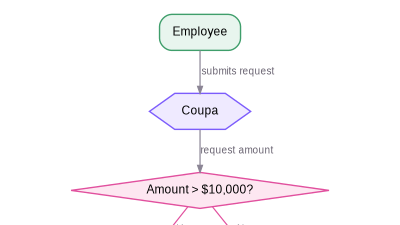
Finance processes
Map procure to pay or order to cash with every control point.
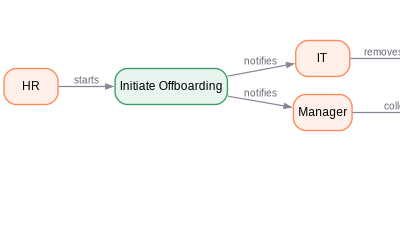
Offboarding and access
List the access to remove and the order to remove it in.
From the conversation to the map
An example walkthrough for process documentation. Wavelength draws each step as the speaker names it.
What someone says"A request comes in through the form. Ops reviews it. If anything is missing, they send it back and ask for the info. If it is complete, they assign an owner and the owner has two days to start."
- Start: Form Submitted
- Person or team: Ops
- Decision: Missing Info? (Yes: Send Back Request; No: Assign Owner)
- Step: Send Back Request
- Step: Assign Owner
- End: Done
- Step: Start Work (within two days)
Features for process documentation
Live diagram building
Hold the mic and talk. Each person, system, and step appears on the flow as you name it. A question like "Complete?" becomes a decision with its branches.
Recording and transcript import
Upload audio or video up to 120 minutes, or a .txt, .md, .vtt, .srt, .json, .pdf, or .docx transcript, and get the flow.
SOP export
Export a .doc SOP with roles, owners, and numbered steps, or copy the SOP as Markdown for a wiki.
Swimlanes
Switch the flow to swimlanes. Each actor gets a lane, and each handoff crosses a lane line.
Dashed amber inferred edges
A connection that the AI inferred, and did not hear, shows as a dashed amber line until you confirm it.
Open file exports
Export to PNG, PDF, PowerPoint, draw.io, Mermaid, and BPMN 2.0. Your flows go where your team works.
Popular integrations for process documentation
 All plans
Chrome side panel
Open Wavelength beside any browser tab and build the diagram while the call runs.
ImportRecordings and transcripts
Upload the call recording or the transcript. The FAQ lists every file type.
 All plans
Confluence
Save a flow as a Confluence page with the summary, the questions to confirm, and a link to the live flow.
ImportMicrosoft Visio
Import Visio .vsdx files in your browser. Each file becomes an editable flow.
 Import and export
Lucidchart
Import Lucidchart diagrams exported as .vsdx. Each file becomes a flow you can edit by voice.
Plans and pricing
3 saved flows, 2 folders, collaborators. No card.
Unlimited flows, 150 mic minutes, 20 upload hours, your logo, teams, version history.
Pro is $7 a month. Cancel any time. See pricing.
Common questions
What is the fastest way to document a business process?
Have the person who does the work explain it out loud while a tool captures it. With Wavelength, the process map builds while they talk, so the first draft is done when the explanation ends.
Can I export the process documentation as an SOP?
Yes. Choose Export and then SOP document for a .doc file with roles, owners, and numbered steps. You can also copy the SOP as Markdown.
Can I import my existing Visio process maps?
Yes. Import a Visio .vsdx file in your browser. Each file becomes an editable flow that you can change by voice or text.
Is there a free plan?
Yes. The free plan holds 3 saved flows and needs no card. Pro is $7 per month.
Put Wavelength to work on process documentation
Talk through a process. Wavelength draws the flow.
The free plan needs no card. The demo needs no account.