
Sales and data template
Inbound Lead to Onboarding template
Qualify a lead, demo, then propose or nurture. This template has 9 shapes: 3 decisions, 2 people and teams, and 1 system or data store.
Free plan, no card. Opens in the Wavelength editor.
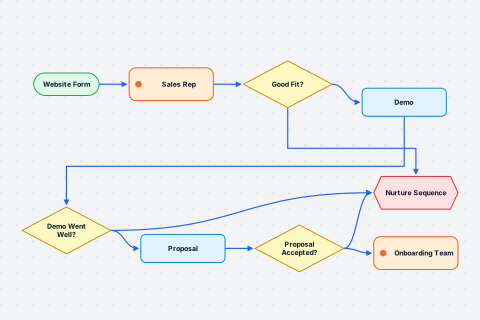
- Website Form Start
- Sales Rep Person or team
- Good Fit? Decision
Yes: Demo. No: Nurture Sequence - Demo Step
- Nurture Sequence System
- Demo Went Well? Decision
Yes: Proposal. No: Nurture Sequence - Proposal Step
- Proposal Accepted? Decision
Yes: Onboarding Team. No: Nurture Sequence - Onboarding Team Person or team
Rep: Walk me through how a new lead moves through your team today.
Customer: A lead fills out the form on our site. A sales rep qualifies them, and if they are a fit we book a demo. If they are not a fit, they go into a nurture sequence.
Rep: What happens after the demo?
Customer: If the demo goes well, we send a proposal. If it does not, they go to nurture. If they accept the proposal, the onboarding team takes over. If they say no, they go to nurture too.
Wavelength drew this flow from the conversation above. Say your own version and it draws yours.
Who uses this template
Sales engineers use it as a starting point. Lead flows and data pipelines that come up on discovery calls. See how sales engineers use Wavelength.
Start from it
Open the template and the flow is on the canvas, laid out and ready to edit.
Change it by talking
Say what is different in your team. Wavelength adds, removes, and renames the shapes for you.
Send it
Share a link, or export to PNG, PDF, PowerPoint, draw.io, BPMN, or an SOP document.
Related templates
View all templates →
Questions
Is the inbound lead to onboarding template free?
Yes. Every Wavelength plan can open this template, the Free plan included. The Free plan saves up to 5 flows and needs no card.
Can I change the template to match my process?
Yes. Open it, then describe what is different in your team, by typing or by holding the mic. Wavelength edits the flow to match. You can also drag, rename, and delete shapes by hand.
What can I export the template to?
Exports include PNG, PDF, PowerPoint, draw.io and Lucidchart, BPMN 2.0, Mermaid, an SOP document, n8n, and a CSV of steps.
Open the inbound lead to onboarding template
It opens in the editor, ready to change by talking.