
Integration · Meetings and calls
 Wavelength
 Granola
 integration
Pick a Granola meeting. Wavelength turns its notes into a process flow you can edit and share.
Every plan, including Free. The free plan needs no card.
 ▶ Watch the demo
What you can do
Map the process from last week's call
Ask for a meeting by name or date. Wavelength gets the notes and builds the flow.
Add details to a flow you have
Pull a follow-up meeting into the open flow. The AI adds the new steps and owners.
Keep a record of who said what
Granola notes become the transcript context of the flow, so reviewers can check the source.
See it in action
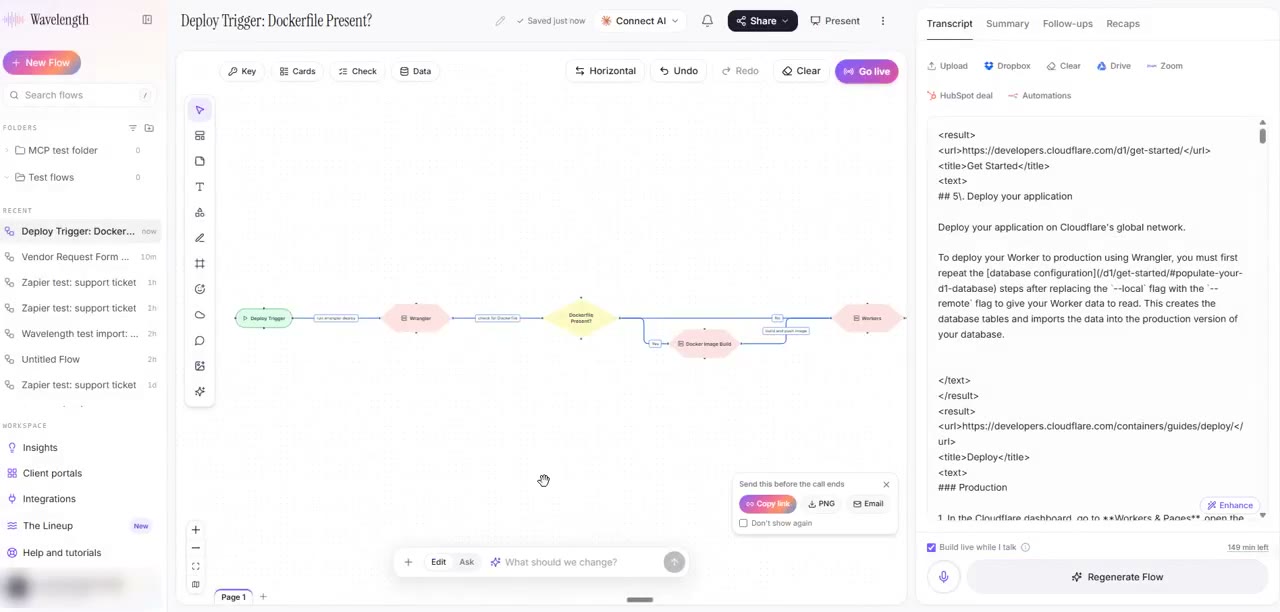
Watch a short demo of the Connect your apps panel. Granola, Glean, and Custom MCP all work this way.
This demo connects a public MCP server (Cloudflare docs) through Custom MCP. With Granola, you sign in to Granola and search your meetings in the same steps.
How it works
- In a flow, click the + button in the prompt box, then Connect your apps. You can also open Settings, then Connected apps.
- Pick Granola and click Connect. Sign in to Granola in the window that opens and allow access.
- Type what to find, for example "my call with Acme last Tuesday", and click Get context.
- Read and edit the notes. Then click Build a flow from this, or Add to this flow.
Worked example
A sales engineer runs a discovery call in Granola with a customer's IT team:
"Tickets come in by email. The service desk sorts them. Anything about access goes to the identity team."
What lands in Wavelength
- A new flow titled from the meeting, with a lane for each team that the notes name.
- Steps for intake, triage, and the access hand-off, with the decision as a diamond.
- The Granola notes saved as the transcript of the flow.
- Open questions that the notes did not answer, ready for the follow-up call.
Who uses this
- Sales engineers: Turn discovery calls into a current-state map before the next meeting.
- Operations and SOP writers: Use interview notes as the first draft of the SOP diagram.
Security and permissions
Wavelength connects to the official Granola MCP server with OAuth. It uses only read tools, such as listing and getting meetings. It cannot change or delete notes.
The Granola token is stored encrypted on the Wavelength server and never goes to the browser. Remove the connection in the Connectors panel or in Settings, then Connected apps.
Organization admins can block Granola for the whole organization in Admin, then Integrations.
Read the Trust Center and the subprocessor list for how Wavelength handles your data.
Common questions
Does Wavelength integrate with Granola?
Yes. Connect Granola, pick a meeting, and Wavelength builds a process flow from its notes or transcript.
Can Wavelength change my Granola notes?
No. Wavelength calls only read tools on the Granola MCP server.
Do I need a paid Granola plan?
Granola controls which plans can use its MCP server. Check your Granola plan if the connection fails.
Which Wavelength plans include Granola?
Every plan, including Free.
 Zoom
 Glean