
Integration · Email and documents
 Wavelength
 Gmail
Gmail integration
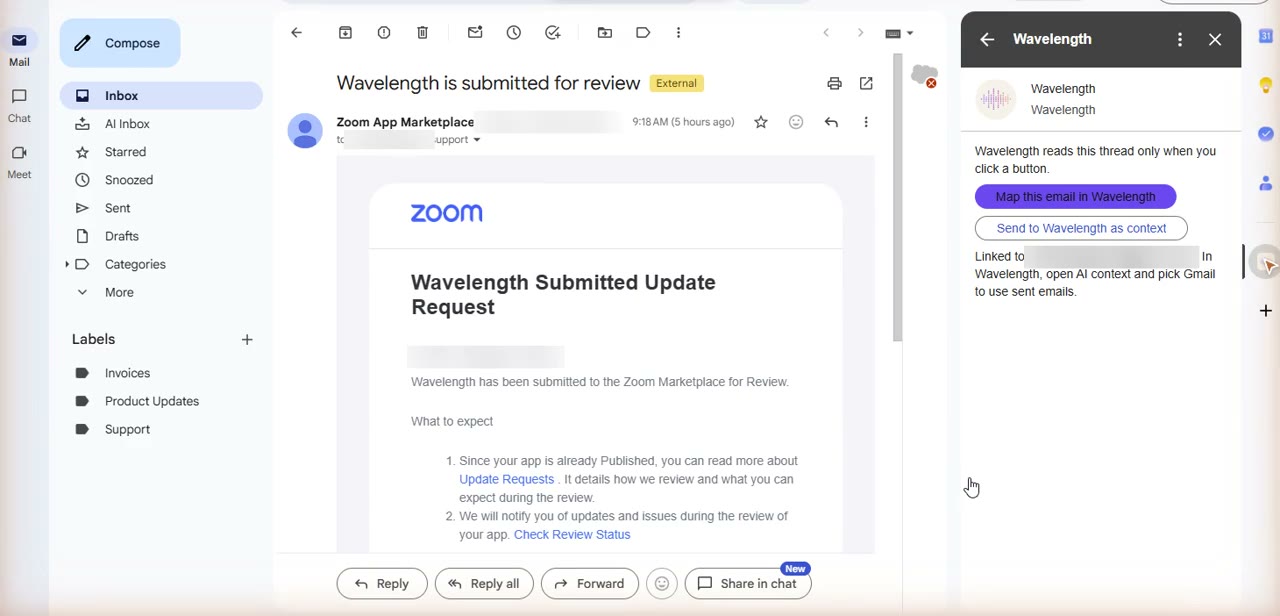
Open an email, click Map this email in Wavelength, and get a process flow of the thread. Or send the thread to Wavelength as AI context for a flow you build later.
Every plan, including Free. The free plan needs no card.
 ▶ Watch the demo
What you can do
Map an email thread
A vendor or a customer describes a process by email. One click turns the thread into a flow in your Wavelength account.
Keep emails as AI context
Send a thread to Wavelength. In a flow, open AI context, then Gmail, and build or edit the flow with that email.
Open the flow from Gmail
When the flow is ready, click Open in Wavelength. The flow opens in a new tab, ready to edit and share.
See it in action
Watch a short demo of the Wavelength add-on for Gmail. The add-on is in review for the Google Workspace Marketplace.
How it works
- Install the Wavelength add-on for Gmail. Open an email and click the Wavelength icon in the Gmail side panel.
- The first time, click Link Wavelength account and sign in to Wavelength. You do this one time.
- Click Map this email in Wavelength to build a flow from the thread, or Send to Wavelength as context to keep the thread for later.
- Click Open in Wavelength to edit the flow. Check each dashed amber line. It marks a link the AI inferred.
Worked example
A supplier sends the steps of their order process by email:
"We receive the purchase order by email. Our sales desk checks stock. If stock is low, the buyer approves a partial shipment. Then the warehouse ships and sends the invoice."
What lands in Wavelength
- A start step, such as "Purchase order received".
- A step for the sales desk, and a decision, such as "Stock low?".
- A Yes branch to the buyer approval, and the warehouse shipping and invoice steps.
- A question to confirm for any missing branch.
Who uses this
- Operations and SOP writers: Turn a long email thread about a process into a first draft of the SOP.
- Sales engineers: Map the process a prospect describes by email before the next call.
Security and permissions
The Wavelength add-on for Gmail uses the gmail.addons.execute and gmail.addons.current.message.action scopes, plus userinfo.email to know which Google account uses the add-on.
The add-on reads only the email thread you have open, and only when you click a button in the add-on. It cannot read your other email and cannot send, change, or delete email.
When you click Send to Wavelength as context, Wavelength stores the subject, sender, date, and text of that thread, up to 20,000 characters. Wavelength keeps your 25 most recent items and deletes older ones. Wavelength does not sell this data, does not use it for ads, and does not train AI models on it.
To remove access, uninstall the add-on, remove Gmail in the AI context panel, or remove Wavelength at myaccount.google.com/permissions.
Read the Trust Center and the subprocessor list for how Wavelength handles your data.
Common questions
What can the Wavelength add-on read in Gmail?
Only the email thread you have open, and only when you click a button in the add-on. It cannot read your other email.
Can the add-on send, change, or delete email?
No. The add-on cannot send, change, label, or delete email.
What does "Send to Wavelength as context" keep?
It keeps the subject, sender, date, and text of that thread, up to 20,000 characters. Wavelength keeps your 25 most recent items and deletes older ones.
How do I get the Gmail add-on?
The add-on is in review for the Google Workspace Marketplace. Until it is listed, you can send labeled emails to Wavelength with the Gmail template on the Wavelength Zapier page.
Which plans include Gmail?
Every plan, including Free.
 Google Drive
 Google Meet
 Zapier