
Integration · Meetings and calls
 Wavelength
 Google Calendar
 integration
Connect Google Calendar in the AI context panel, pick a meeting, and build a process flow from its title, people, and description.
Every plan, including Free. The free plan needs no card.
 ▶ Watch the demo
What you can do
Start a flow from a meeting
Pick the meeting where the process came up. Wavelength uses its title, time, people, and description as context.
Combine sources
Pick up to five items. Add the meeting next to a transcript, a Drive file, or an email for a fuller flow.
Prepare before the call
Build a first draft of the process from the meeting invite, then confirm it with the customer on the call.
See it in action
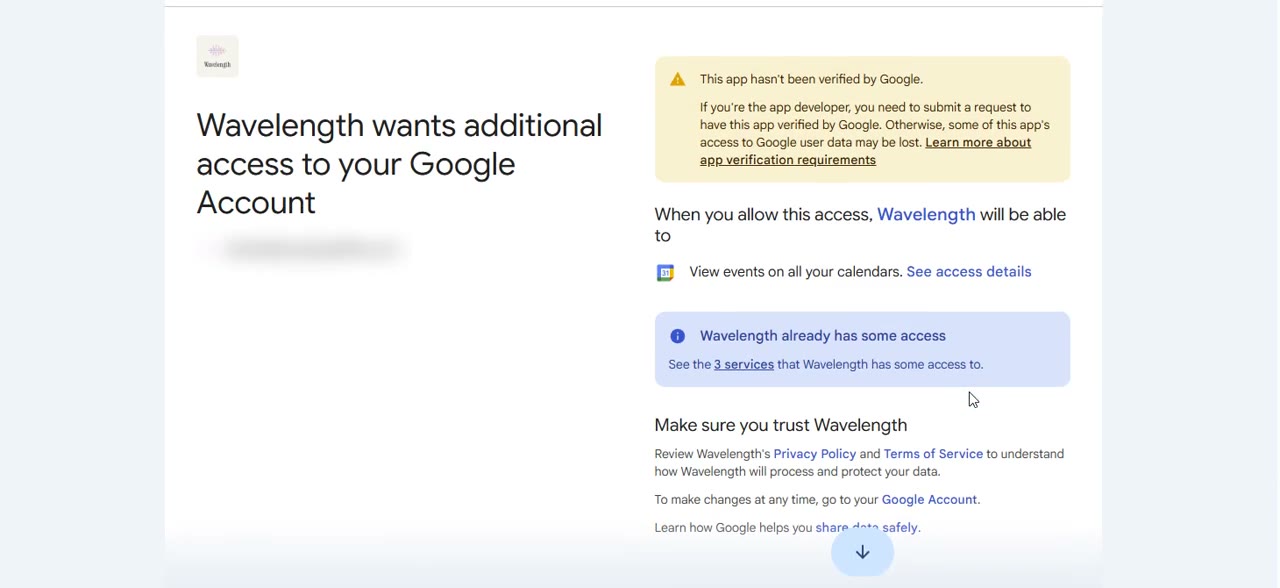
Watch a short demo of Google Calendar in Wavelength, from the Google permission screen to a flow.
How it works
- In a flow, open the + menu in the prompt box and pick Bring in context. Find Google Calendar and click Connect.
- Google asks you to allow Wavelength to view events on your calendars. Allow it. The access is read only.
- Search or scroll the list, pick a meeting, and click Get context.
- Click Build a flow from this. Check each dashed amber line. It marks a link the AI inferred.
Worked example
A meeting invite holds the agenda for a process review:
"Northwind Supply order review. Review the Northwind Supply order intake process."
What lands in Wavelength
- The meeting title, time, and description as context.
- A first flow for the order intake process.
- Questions to confirm with the attendees in the meeting.
Who uses this
- Sales engineers: Start the current-state map from the discovery call invite.
- Consultants: Prepare a draft process before each workshop.
Security and permissions
Google Calendar uses the calendar.events.readonly scope. This is a separate permission from Google Drive.
Wavelength lists your own meeting events only when you open the Google Calendar source, and reads one event only when you pick it. Wavelength cannot create, change, or delete events, and it does not store your events.
Wavelength stores the encrypted connection token only. Wavelength does not sell Google user data, does not use it for ads, and does not train AI models on it.
To remove access, remove Google Calendar in the AI context panel, or remove Wavelength at myaccount.google.com/permissions.
Read the Trust Center and the subprocessor list for how Wavelength handles your data.
Common questions
What does Wavelength read from Google Calendar?
Wavelength lists your own meeting events when you open the Google Calendar source. It reads one event only when you pick it: the title, time, attendees, location, conference link, attachment links, and description.
Can Wavelength change my calendar?
No. Wavelength uses the calendar.events.readonly scope. It cannot create, change, or delete events.
Does Wavelength store my events?
No. Wavelength does not store your events. The event text goes into the flow you build.
Which plans include Google Calendar?
Every plan, including Free.
 Google Meet
 Google Drive
 Gmail