
Customer success template
Data Migration Handoff template
Customer exports, CSM validates, engineer maps, test, sign-off. This template has 11 shapes: 1 decision and 3 people and teams.
Free plan, no card. Opens in the Wavelength editor.
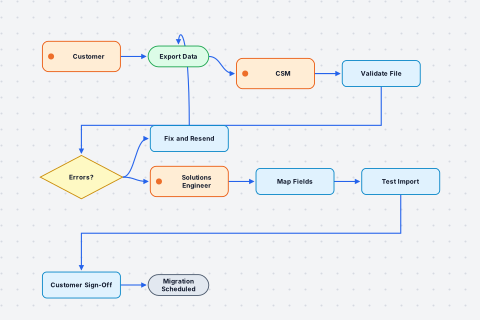
- Customer Person or team
- Export Data Start
- CSM Person or team
- Validate File Step
- Errors? Decision
Yes: Fix and Resend. No: Solutions Engineer - Fix and Resend Step
- Solutions Engineer Person or team
- Map Fields Step
- Test Import Step
- Customer Sign-Off Step
- Migration Scheduled End
The customer exports their data from the legacy system. The CSM validates the file format and checks for errors. If there are errors, the CSM sends it back to the customer to fix and resend. If the file is clean, the solutions engineer maps the fields to the new schema. The engineer runs a test import so the customer can review it. The customer signs off on the test. Once signed off, the migration is scheduled.
Wavelength drew this flow from the conversation above. Say your own version and it draws yours.
Who uses this template
Customer success teams use it as a starting point. Onboarding and handoff plans from kickoff to go-live. See how customer success teams use Wavelength.
Start from it
Open the template and the flow is on the canvas, laid out and ready to edit.
Change it by talking
Say what is different in your team. Wavelength adds, removes, and renames the shapes for you.
Send it
Share a link, or export to PNG, PDF, PowerPoint, draw.io, BPMN, or an SOP document.
Related templates
View all templates →
Questions
Is the data migration handoff template free?
Yes. Every Wavelength plan can open this template, the Free plan included. The Free plan saves up to 5 flows and needs no card.
Can I change the template to match my process?
Yes. Open it, then describe what is different in your team, by typing or by holding the mic. Wavelength edits the flow to match. You can also drag, rename, and delete shapes by hand.
What can I export the template to?
Exports include PNG, PDF, PowerPoint, draw.io and Lucidchart, BPMN 2.0, Mermaid, an SOP document, n8n, and a CSV of steps.
Open the data migration handoff template
It opens in the editor, ready to change by talking.