
Integration · Process and automation
 Wavelength
 Excel and Google Sheets
Excel and Google Sheets export
Get the steps and the numbers of a process into a spreadsheet you can total and chart.
Every plan, including Free. The free plan needs no card.
What you can do
Size the waste in a process
Total active time and wait time across steps to show where the delay is.
Build a cost model
Add the cost you set on each step, then sum it per run in your sheet.
Track owners and status
Filter by owner or status to plan the fixes.
See it in action
These screenshots come from a real Wavelength account and Excel.
How it works
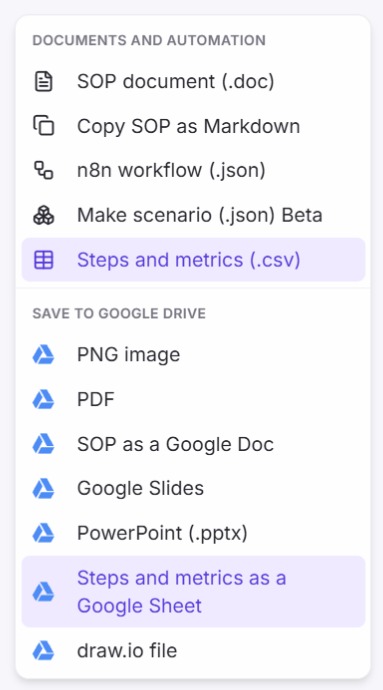
- Open the flow. Set owners and metrics on the steps you want in the file.
- Open Export and pick Steps and metrics (.csv).
- Or, under Save to Google Drive, pick Steps and metrics as a Google Sheet.
Worked example
A process improvement lead times each step of a returns flow:
"Receiving logs the return in about 5 minutes, but it sits for two days before inspection."
What lands in the spreadsheet
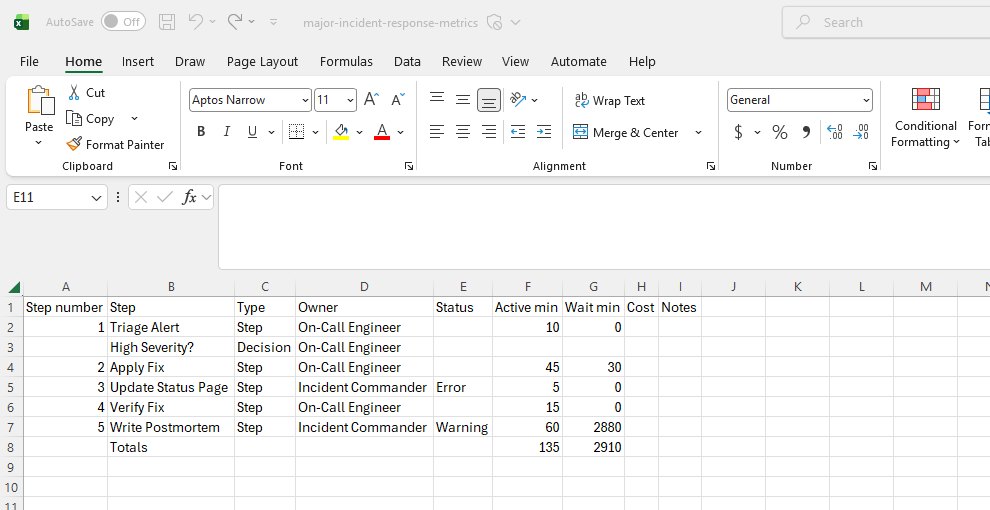
Step number,Step,Type,Owner,Status,Active min,Wait min,Cost,Notes
1,Log return,Step,Receiving,,5,2880,,
,Return OK?,Decision,Inspection,,,,,
2,Issue refund,Step,Finance,,,,,
,Totals,,,,5,2880,,
Decision rows have no step number. When steps have metrics, a Totals row sums active time, wait time, and cost.
Who uses this
- Operations and SOP writers: Find the longest wait in a process and show it in numbers.
- Consultants: Back a recommendation with time and cost per step.
Security and permissions
The .csv file is built in your browser and makes no AI call.
A Google Sheets save uses the drive.file scope, so Wavelength sees only the files it creates.
Read the Trust Center and the subprocessor list for how Wavelength handles your data.
Common questions
Can I export a flow to Excel?
Yes. Export the steps and metrics as a .csv file and open it in Excel.
Can I save it as a Google Sheet?
Yes. Connect Google Drive, then pick Steps and metrics as a Google Sheet.
What columns are in the file?
Step number, step, type, owner, status, active minutes, wait minutes, cost, and notes.
Which plans include the export?
Every plan, including Free.
 PowerPoint and Google Slides
 Google Drive