
Integration · Chat and channels
 Wavelength
 Microsoft Teams
Microsoft Teams integration
Map the process during a Teams call, then post the finished flow to the channel as a card.
Every plan, including Free. The free plan needs no card.
What you can do
Capture the process on the call
Open the side panel beside Teams on the web. Talk through each step and watch the flow form.
Turn a recording into a flow
Upload the Teams recording or the transcript file after the call. Wavelength builds the flow from it.
Post a card the channel can act on
The card shows the summary, the questions to confirm, and an Open in Wavelength button.
See it in action
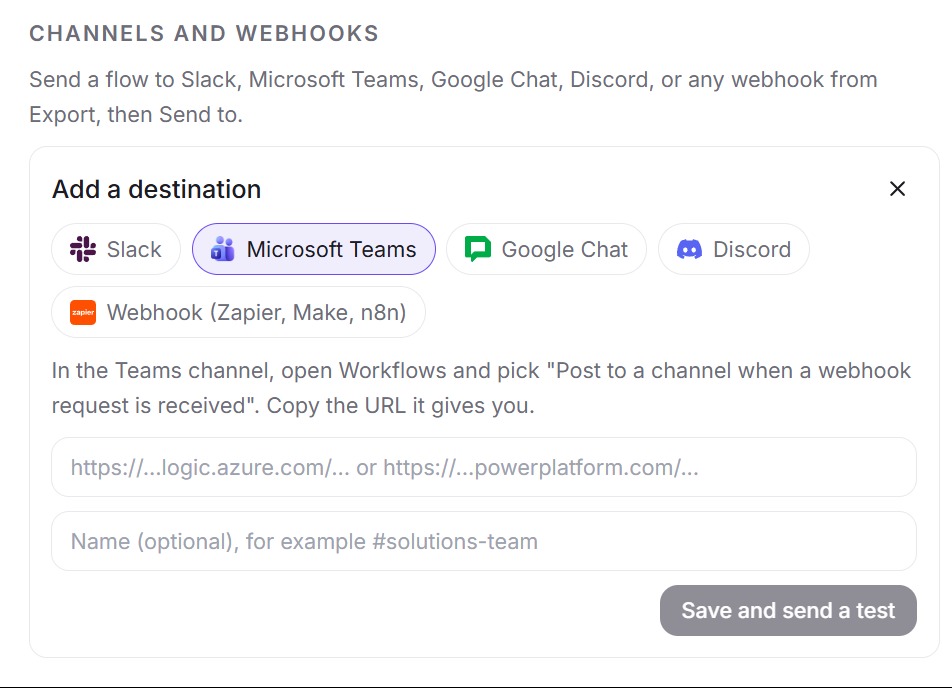
This screenshot comes from a real Wavelength account.
How it works
- In the Teams channel, open Workflows and pick "Post to a channel when a webhook request is received". Copy the URL it gives you.
- In Wavelength, open Settings, then Channels and webhooks, then Add. Pick Microsoft Teams and paste the URL.
- Wavelength sends a test card to the channel.
- On any flow, click Export, pick the channel under Send to, and confirm.
Worked example
A service desk manager describes laptop repairs:
"When a laptop breaks, the user opens a ticket. The service desk triages it. Hardware faults go to the depot team."
What lands in the Teams channel
- An Adaptive Card with the flow title in bold, such as "Laptop repair".
- A list of summary lines, such as "Service desk triages Ticket".
- A "Questions to confirm" list, when the flow has open questions.
- An Open in Wavelength button that opens the flow.
Who uses this
- Technical project managers: Post the agreed process to the project channel after a requirements call.
- Consultants: Run the workshop on Teams, then share the as-is map with the client team.
Security and permissions
The Workflows URL needs no OAuth scopes and no admin app install. Wavelength accepts URLs on webhook.office.com, logic.azure.com, powerplatform.com, and powerautomate.com. It can post to the channel. It cannot read Teams chats or files.
Wavelength stores the URL encrypted and limits sends to 60 per hour per account. The side panel uses your microphone and does not join the meeting.
Read the Trust Center and the subprocessor list for how Wavelength handles your data.
Common questions
Does Wavelength work with Microsoft Teams?
Yes. Use the Chrome side panel beside Teams on the web, upload the recording after the call, and post the flow to a Teams channel.
Does Wavelength join Teams meetings?
No. Wavelength does not join meetings. You use your own microphone in the side panel, or you upload the recording.
Does a Teams admin need to install an app?
No. Channel posts use a Teams Workflows webhook that a channel member can create.
Which plans include Microsoft Teams?
Every plan, including Free.
 Slack
Slack Google Meet
 Zoom
Zoom