
Integration · Work tracking
 Wavelength
 Jira
JiraJira integration
Turn the process you mapped on a call into a Jira issue that your team can plan and track.
Every plan, including Free. The free plan needs no card.
What you can do
Turn a gap into a ticket
The call shows a broken handoff. Create a Story with the flow attached, so the fix starts with the full picture.
Add context to work in progress
Search by summary or key, such as OPS-12, and add the flow as a comment.
Give engineering the open questions
The description lists the questions to confirm, so they get answered before the build.
See it in action
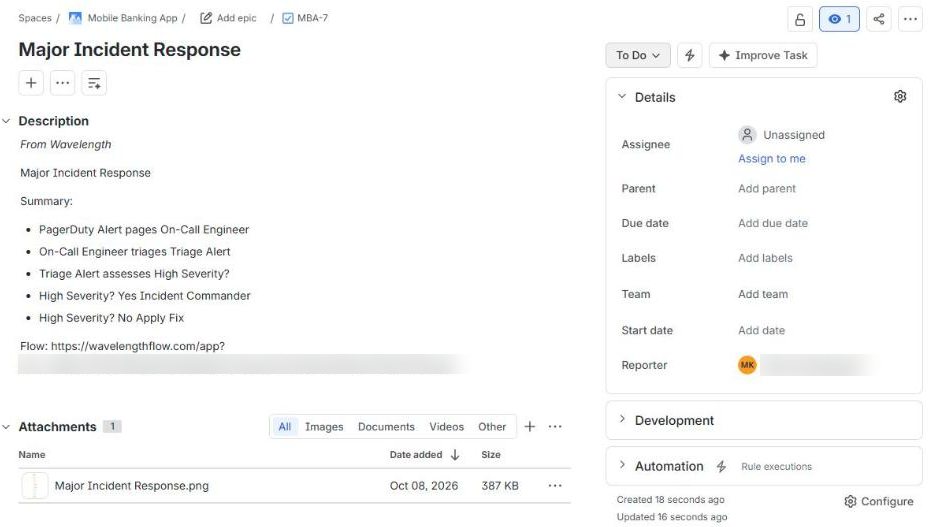
These screenshots come from a real Wavelength account and a Jira Cloud site with sample projects.
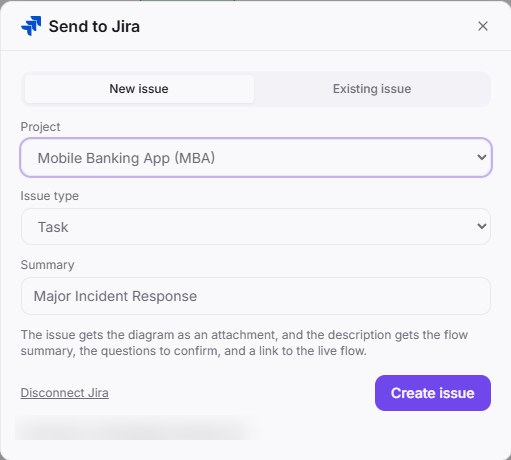
How it works
- In Wavelength, open Settings, then Connected apps, and click Connect next to Jira. You can also start from Export, then Send to Jira.
- Sign in to Atlassian, pick your Jira site, and click Accept.
- Open a flow, click Export, then Send to Jira.
- Pick a project and an issue type, then click Create issue.
Worked example
A support manager describes escalations on a call:
"Tier 1 tags the ticket. If it is a bug, it goes to the on-call engineer. Nobody tells the customer when it is fixed."
What lands in Jira
- Issue summary: the flow title, such as "Bug escalation".
- Description: "From Wavelength", then the title, the summary lines, and the questions to confirm.
- On Pro and higher plans, a link to the flow at the end of the description. On Free, the link is left out.
- The diagram as a PNG attachment.
Who uses this
- Technical project managers: Open a ticket from the process gap while the call is fresh.
- Customer success and implementation: Log the customer's broken handoff with the diagram engineering needs.
Security and permissions
Wavelength asks Atlassian for read:jira-work, write:jira-work, read:jira-user, and offline_access. It uses them to list projects, search issues, and create the issues and comments you send.
Tokens are stored encrypted. Disconnect in Settings, then Connected apps, or remove the app in your Atlassian account under Connected apps.
Read the Trust Center and the subprocessor list for how Wavelength handles your data.
Common questions
Does Wavelength work with Jira?
Yes. Wavelength creates a Jira issue from a flow, with the diagram as an attachment and the summary and the questions to confirm in the description. It can also add a flow to an existing issue as a comment.
Which Jira works with Wavelength?
Jira Cloud. Jira Data Center and Jira Server are not supported.
Which issue types can I create?
Any standard issue type in the project, such as Task, Story, or Bug. Subtasks are not offered.
What if I use more than one Jira site?
Pick the site when you connect. If your account can use more than one site, switch it in the Send to Jira dialog.
Which plans include Jira?
Every plan, including Free. The link to the flow in the issue needs Pro or higher.
 Confluence
 Slack
Slack Salesforce