
Integration · Chat and channels
 Wavelength
 Google Chat
Google Chat integration
Send the process map to the Google Chat space where your Workspace team plans the work.
Every plan, including Free. The free plan needs no card.
What you can do
Hand off after a discovery call
Post the flow to the deal space. The account team sees the steps without a separate recap.
Ask the space to fill the gaps
The message lists the questions to confirm. People in the space answer them in the thread.
Post from an AI assistant
Ask Claude or ChatGPT to send a flow to a channel. The Wavelength connector lists your saved spaces and posts to the one you pick.
See it in action
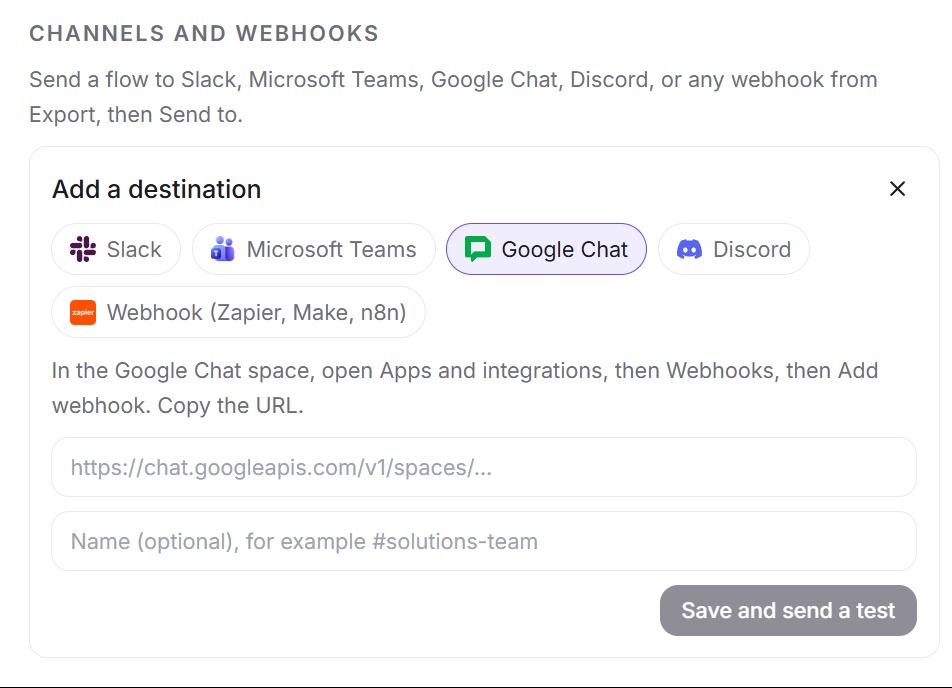
This screenshot comes from a real Wavelength account.
How it works
- In the Google Chat space, open Apps and integrations, then Webhooks, then Add webhook. Give it a name and copy the URL.
- In Wavelength, open Settings, then Channels and webhooks, then Add. Pick Google Chat and paste the URL. It must start with https://chat.googleapis.com/v1/spaces/.
- Wavelength posts a test message to the space.
- On any flow, click Share, then More formats, and pick the space under Send to.
Worked example
An IT lead explains laptop setup for new hires:
"HR sends the request to IT. IT images the laptop and ships it. Remote hires get it by courier."
What lands in Google Chat
*Laptop provisioning*
• HR sends request to IT
• IT images Laptop
• IT ships Laptop

Questions to confirm:
• Does IT send data to Courier?
Open in Wavelength
Google Chat shows the title in bold. "Open in Wavelength" is a link to the flow.
Who uses this
- Sales engineers: Drop the customer's process into the deal space before the internal debrief.
- Technical project managers: Post the agreed flow to the project space so engineering sees the same steps.
Security and permissions
A Google Chat space webhook needs no OAuth scopes. It can post to one space and cannot read messages.
Wavelength stores the URL encrypted, accepts only chat.googleapis.com space URLs, and limits sends to 60 per hour per account. A send from the app links to the flow in Wavelength, so readers need access to the flow. A send from the AI connector uses the public link when the flow is shared.
Read the Trust Center and the subprocessor list for how Wavelength handles your data.
Common questions
Does Wavelength integrate with Google Chat?
Yes. Wavelength posts a flow to a Google Chat space through a space webhook.
Can Wavelength read my Google Chat messages?
No. A space webhook can only post. Wavelength cannot read the space.
Can people without a Wavelength account open the link?
A send from the app links to the flow in Wavelength, so share the flow with them first. A send from Claude or ChatGPT uses the public read-only link when the flow is shared.
Which plans include Google Chat?
Every plan, including Free.
 Slack
Slack Microsoft Teams
 Google Drive