
Product and UX template
Checkout User Flow template
Cart, shipping, payment, order confirmation with error retry. This template has 8 shapes: 1 decision.
Free plan, no card. Opens in the Wavelength editor.
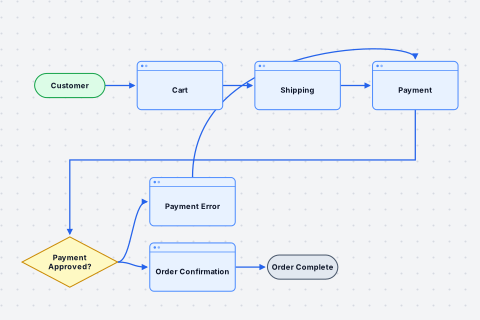
- Customer Start
- Cart Screen
- Shipping Screen
- Payment Screen
- Payment Approved? Decision
Yes: Order Confirmation. No: Payment Error - Order Confirmation Screen
- Payment Error Screen
- Order Complete End
The customer views their cart and clicks Checkout. They enter their shipping address on the Shipping screen. They move to the Payment screen and enter their card details. The system checks if the payment is approved. If approved, they see the Order Confirmation screen. If the payment fails, they see a Payment Error screen and can go back to retry. After confirmation, the order is complete.
Wavelength drew this flow from the conversation above. Say your own version and it draws yours.
Who uses this template
Product managers, designers, and payment engineers use it to agree on each checkout screen before a build. Add the screens your store has, such as a coupon field, a saved card, or a guest checkout. Add each error path the payment provider can return. See how product managers map user flows, or read the checkout user flow example with Mermaid code.
Start from it
Open the template and the flow is on the canvas, laid out and ready to edit.
Change it by talking
Say what is different in your team. Wavelength adds, removes, and renames the shapes for you.
Send it
Share a link, or export to PNG, PDF, PowerPoint, draw.io, BPMN, or an SOP document.
Related templates
View all templates →
Questions
Can I add a guest checkout path to this template?
Yes. Say the change, for example: add a guest checkout option after the cart. Wavelength adds the decision and the new screen.
How do I show a failed payment?
The template already has a Payment Approved? decision with a retry loop. Add more branches for each error that your payment provider returns.
Can engineers use the checkout flow in a design doc?
Yes. Copy the flow as Mermaid for a README or a pull request, or export a PNG or a draw.io file.
Map your checkout before you build it
Start from these screens. Say your own error paths and Wavelength adds them.