
Integration · AI assistants (MCP)
 Wavelength
 ChatGPT
ChatGPT integration
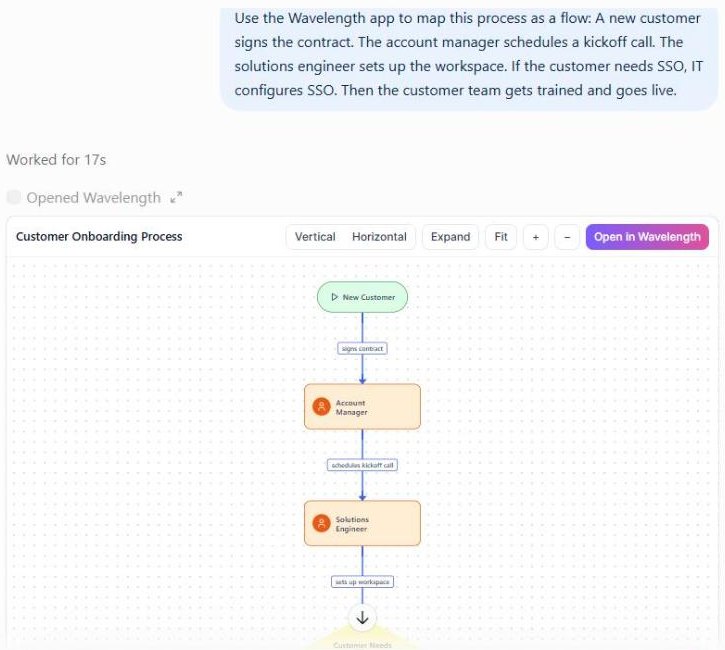
Ask ChatGPT to build or change a flow, then pan and zoom the diagram without leaving the chat.
Every plan, including Free. The free plan needs no card.
What you can do
Draft a flow from a transcript
Paste a transcript. ChatGPT saves the flow to your account and draws it inline. You can drag nodes in the chat.
See what changed
Ask what moved since the last edit. The compare_versions tool lists added, removed, and changed steps.
Write the follow-up
Ask for recaps. The write_recaps tool drafts a customer email, a handoff note, and a short update for your manager from the flow.
See it in action
This screenshot comes from a real ChatGPT chat with the Wavelength app.
How it works
- In ChatGPT, open Settings, then Security and login, and turn on Developer mode.
- Open Plugins in the sidebar, click +, then Create app, then Create MCP App.
- Name it Wavelength, paste https://wavelengthflow.com/api/mcp, and set Authentication to OAuth.
- Tick "I understand and want to continue", click Create, sign in, and click Approve.
- In a new chat, click + and select Wavelength.
Worked example
After a call with a logistics customer, you type:
"Use my notes to map how Northwind books a pickup. Then write the recap email I send them today."
What ChatGPT does with Wavelength
- Saves a new flow from your notes and shows it as a diagram you can pan and zoom.
- Runs write_recaps, which uses only facts in the flow and its saved transcript.
- Returns a customer recap, a handoff note for the implementation team, and a two to four sentence update for leadership.
- Uses one AI help call from your plan for the recaps.
Who uses this
- Sales engineers: Go from call notes to a recap email and a diagram in one chat.
- Customer success and implementation: Write the implementation handoff straight from the mapped process.
Security and permissions
ChatGPT signs in with OAuth. Each tool acts only as you, and your plan limits apply.
Read-only mode in Settings, then AI connector, blocks every tool that creates, edits, shares, or deletes. Wavelength does not train AI models on your content.
Read the Trust Center and the subprocessor list for how Wavelength handles your data.
Common questions
Does Wavelength work with ChatGPT?
Yes. Add Wavelength as an MCP app in developer mode. ChatGPT can then create, read, edit, and share your flows.
Do I need developer mode?
Yes. Turn on Developer mode in ChatGPT before you add the app.
I connected before September 24, 2026. What do I do?
Delete the Wavelength app in ChatGPT under Settings, then Plugins, and add it again with the same URL. A reconnect alone does not work.
Does it cost extra?
No. The connector uses your normal Wavelength plan. A free account works.
 Claude
 Cursor
 Slack
Slack